Create a flat (space)
A flat is the home for all your rooms. Here is how to make one.
Last updated:
What is a flat?
A flat is your space on flat.social. It holds your rooms, your branding, your members, and your settings, and it lives at its own web address like flat.social/f/your-name. Every new flat starts with a ready-made set of rooms that you can rename, rebuild, or delete.
Your first flat is created for you
If you just signed up, the welcome setup builds your first flat with you. It asks what you want to use flat.social for (For my remote team, For my students, or Virtual Event Space), lets you name the flat, and then offers to invite people. When it finishes, you land inside your new flat. You can also pick Just explore the app for now and create a flat later.
How to create another flat
- 1Open My flats
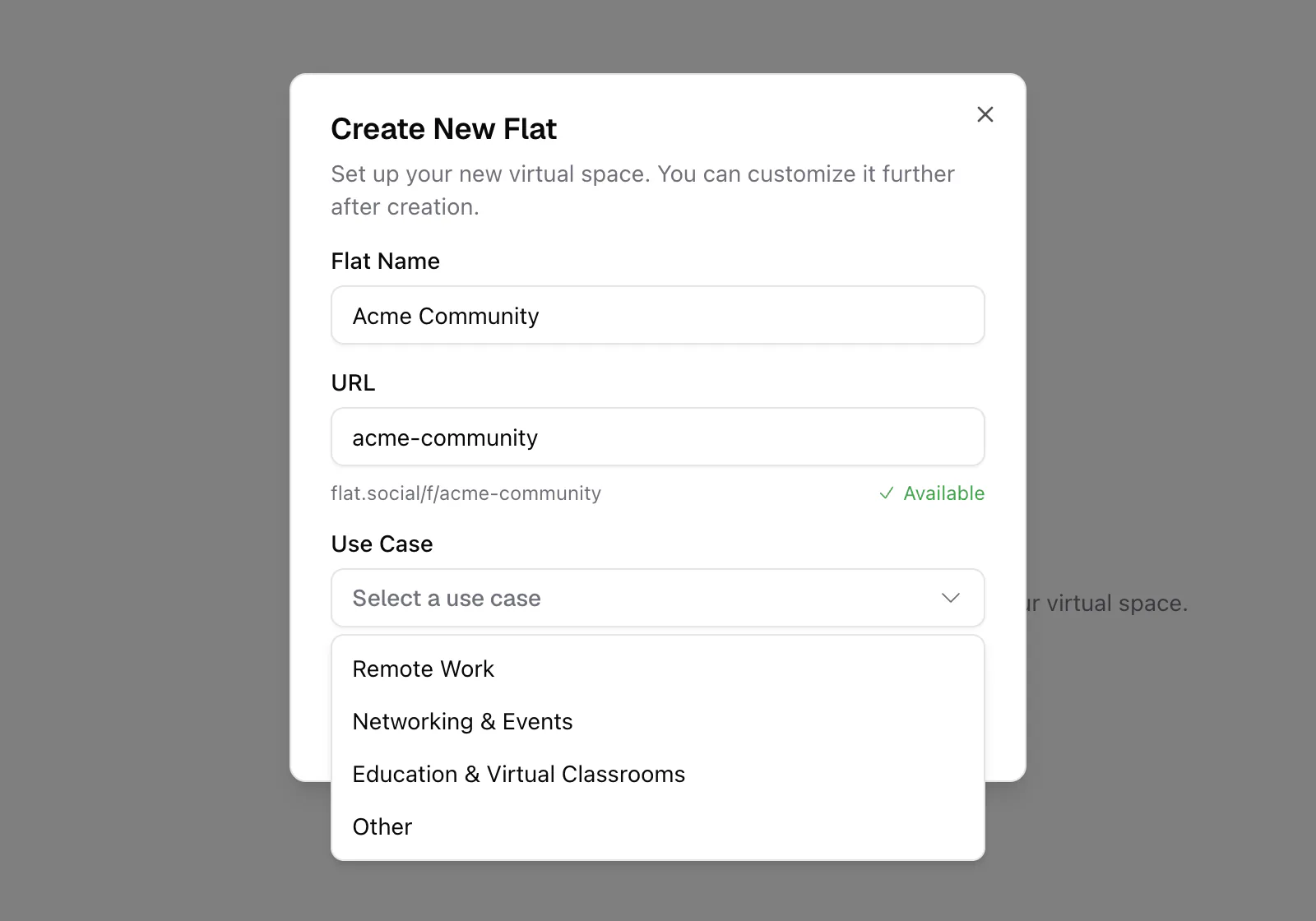
Sign in, go to My flats, and click New Flat. The Create New Flat dialog opens.
- 2Name your flat
Type a Flat Name (3 to 60 characters). This is what people see at the top of your lobby and in every room.
- 3Check the URL
The URL fills in from the name. Edit it if you like: 6 to 32 characters, lowercase letters, numbers, and dashes, not starting or ending with a dash. The preview shows flat.social/f/your-url, and flat.social marks it Available or Already taken as you type.
- 4Choose a use case
Pick Remote Work, Networking & Events, Education & Virtual Classrooms, or Other. flat.social uses it to give you a starter set of rooms, maps, lobby categories, and activities that fit.
- 5Create and open it
Click Create Flat. The new flat appears as a card in My flats. Click the card to enter your lobby.
What's inside a new flat?
A new flat is not empty. Based on your use case, it comes with a set of rooms (with maps, lighting vibes, and lobby card covers already set), lobby categories, and a few pinned activities. Treat them as a starting point: rename them, rebuild them in build mode, or delete the ones you don't need.
Owners and admins also see a Set up your flat checklist in the lobby, with shortcuts to Invite members and Personalize your space.
You can change the address in Settings → General → Basic Information → Flat URL. When you do, flat.social/f/your-old-url stops working, so share the new link with your guests.