7 best Spot Virtual alternatives in 2026, free and paid
Spot is a 3D office with team chat built in, from $6 per user per month and with no free plan. No surprise here, our pick among the alternatives is flat.social: an office you walk around in the browser, free for 5 people at once, with games in the room. Not convinced yet? Six more follow, each set next to Spot, so you can pick for yourself.
Free up to 5 people, no credit card required
Spot, which most people search for as Spot Virtual, is a virtual office drawn as a 3D floor plan, and a good-looking one. Avatars walk between furnished rooms, and the same app holds chat channels, direct messages, video meetings and screen sharing. In 2026 its home page calls it "the virtual workspace for humans and agents", because you can now plug your own AI agent into it (yes, the bot gets an avatar too).
It's a well-made product, and we'll say so wherever it matters. So why does anyone go looking for something else? A few plain reasons. Spot starts at $6 per user per month and there's no free plan once the 30-day trial ends, the 3D world is built around desktop apps for Windows and macOS, and not every team wants to move its chat into the office tool.
Here's the plan for this page. First you meet flat.social, the Spot Virtual alternative we build ourselves, and we tell you straight where it beats Spot and where it doesn't. Then, in case we're not your thing, come six more Spot Virtual alternatives with prices, each one put next to Spot so you can see what you'd gain and what you'd give up.
Let's get to it.
Our answer: flat.social :)
We've been cooking this one for a while. Our mission? Make remote work feel more... human. We want to give your team the most delightful virtual office, one they will love both for collaboration and for hanging out.
Over 33 thousand people have spent time socializing and collaborating in virtual spaces on flat.social. Remote teams, online schools and communities loved it and have already created close to 800 virtual spaces!
- spaces created
- 785
- people hung out
- 33,000+
- countries
- 141
Why flat.social?
- Free stays free. flat.social is free for 5 people at once, with no time limit and no card. Spot's pricing page says it "does not offer an ongoing free plan"; you get 30 days, and then the meter starts.
- You always know what a seat is. We sell concurrent seats at $6 each per month: the number of people who can be inside at the same moment. Spot charges "per user" and counts guests as users. Its pricing page doesn't say in plain words whether that means everyone with an account or the people online together.
- There's something to play, not only somewhere to sit. Football with a scoreboard, Grand Prix racing, bowling, chess and a maze race run inside the map. You can go surfing, do a backflip or turn up by helicopter. Spot lists no games; it has emotes, a DJ speaker, shared YouTube and objects such as a gong and a barbecue.
- A one-off event has a price tag you can read. A flat.social Day Pass is $2 per seat for 24 hours, bought online. Spot's event pricing "starts at $3 per user per day" and is arranged by contacting its team.
- One link, any browser. flat.social opens in Chrome, Safari, Firefox or Brave, and a guest types a name and walks in. Spot runs in the browser too (it recommends Chrome) and has guests and public room links, but it doesn't publish whether a guest has to sign in.
- The office is yours to rearrange. Our build mode is live: you move the furniture while the team is standing in the room. Spot has a floorplan editor with templates, and keeps full customisation for its Growth plan.
Now the honest bit. flat.social doesn't have Spot's chat or its agent connection. If you came to Spot so that channels, meetings and your AI agents could all live in one app, we might not be your vibe, and we go through that properly further down. If you already have a chat tool you like and want a place where the team bumps into each other, that's the part we're good at.
What is the best Spot Virtual alternative?
For teams that want the walk-around office without Spot's subscription from day 31, the best Spot Virtual alternative is Flat.social: a browser-based 3D world with proximity audio, meeting rooms, games in the room (the scoreboard is real) and guests who join from a link. It is free for 5 people at once with no time limit and $6 per concurrent seat per month after that. Teams that chose Spot to replace their chat and meeting tools in one app should look at Roam, and teams that want an avatar office with phone apps should look at SoWork or Kumospace.
Spot gives you an office. This is closer to a small world.
Spot draws a floor plan in 3D: rooms, desks, sofas, a kitchen. flat.social is also 3D, seen from above, and it doesn't stop at the office walls. The same space can hold desks, a beach, a race track and a helicopter pad, all sitting on a physics engine (no planning permission needed). You find colleagues by looking at the map and you start talking by walking over to them.
What's in the box?
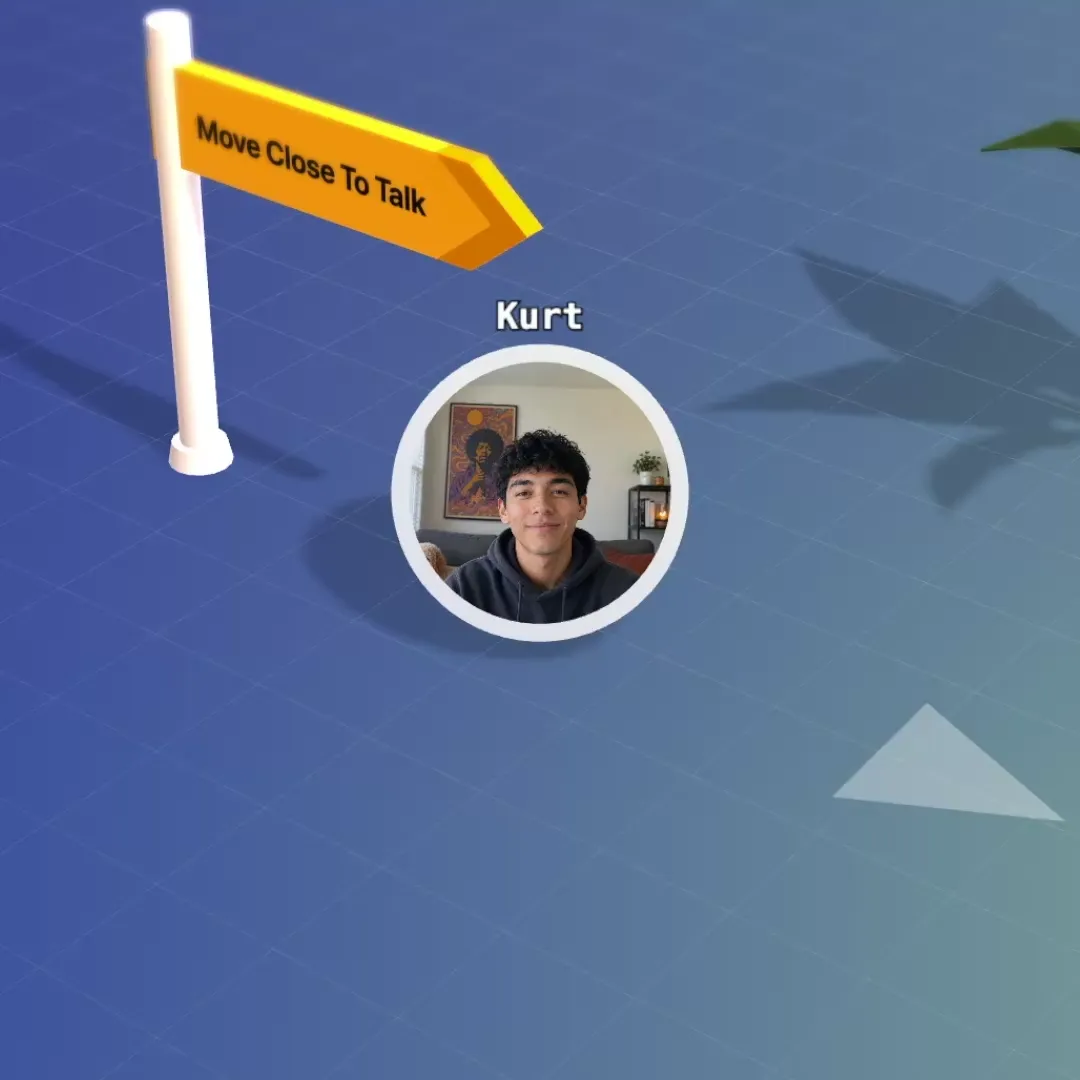
Bump into a colleague again.
No invite, no link. Walk over and talk, and hear the people near you. Voices fade with distance, so groups form the way they do at a cocktail party.
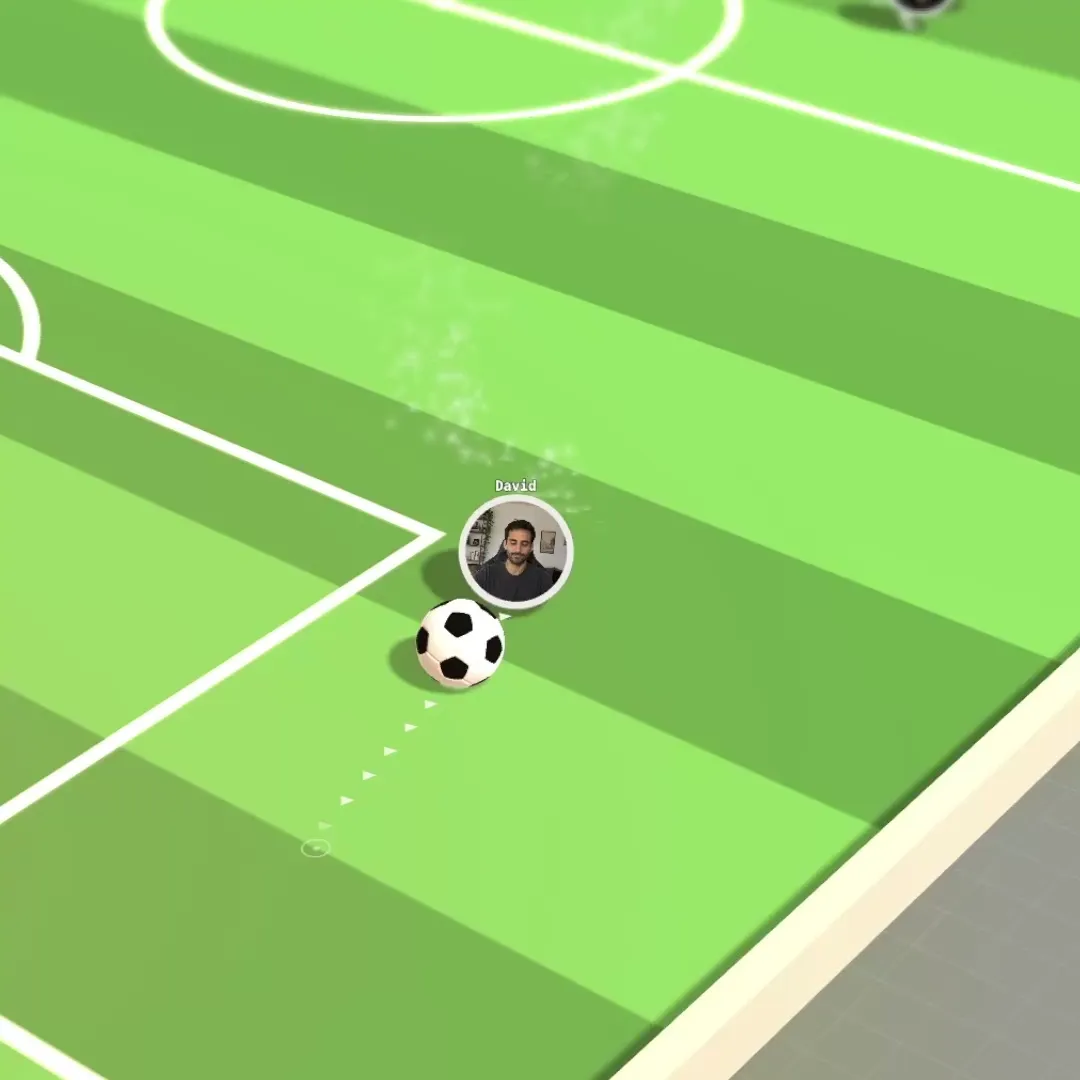
Friday socials people turn up to.
Set up the space once and send the link. People drift between games, the bonfire and small groups without anyone hosting.
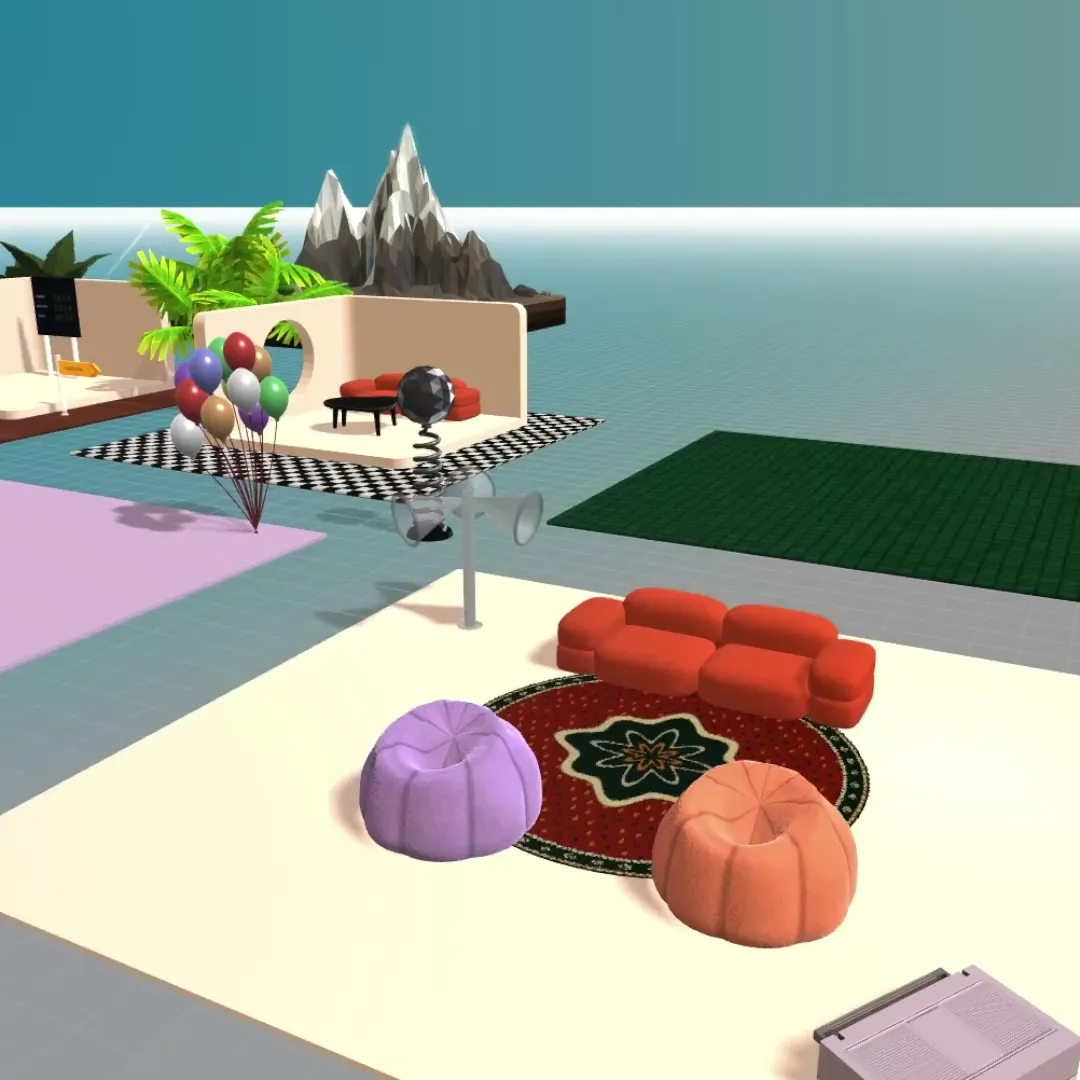
Your office in a minute.
Start from a template, then make it yours. Pick from hundreds of interactive elements and activities, and build your office like in The Sims.
- Open the link
- Check your camera
- You're in
Just one link.
Nothing to install and nothing to schedule. Guests click it and walk in, no account needed.
A chat for every room.
Message the whole space, a single room or one person, without leaving the map.
The right keys for everyone.
Make people admins, moderators, members or guests, and see who is around at a glance.
It's fun, but we got you if you gotta focus too
In Spot a meeting happens in a room on the floor plan, and that's one of the things it gets right. We do it the same way. Walk into a meeting room and everyone is on one screen with screen sharing, slides and a whiteboard. Walk out and you're back among the desks, hearing whoever is nearest. One space holds up to 100 people at once, and more if you ask.
Flat.social vs Spot, side by side
Spot's column comes from its own pricing, support and download pages and its app-store listings, as of November 2026. Where Spot does not publish something, the cell says so. Our column matches the pricing page.
Flat.social vs Spot
| Flat.social | Spot | |
|---|---|---|
| Free plan | Yes, 5 people at once, no time limit | No, 30-day free trial |
| Paid price | $6 per seat per month | Basic $6, Growth $10 per user per month ($4.80 and $8 on yearly billing) |
| What you pay for | Concurrent seats you pick (6 to 100), not named users. Drop us an email if you need more than 100. | Per user; guests, members and admins all count as users. Registered or simultaneous is not stated |
| 25 people for one month | $150 | $150 on Basic, $250 on Growth |
| One-off events without a subscription | $2 per seat Day Pass, valid 24 hours | From $3 per user per day, arranged with their team |
| Guests can join without an account, if you allow them | Guest role and public room links; whether a guest must sign in is not published | |
| Runs in the browser, nothing to install | Browser (Chrome recommended), plus desktop apps | |
| Spatial (proximity) audio | Yes, optional, switched on per room | |
| Video calls | ||
| Built-in games and activities | Football, Grand Prix racing, surfing, bowling, chess, speed networking | No games listed; emotes, a DJ speaker, shared YouTube and interactive objects |
| Edit the map live, from inside the room | Floorplan editor with templates; full customisation on Growth | |
| Visual style | Delightful low-poly 3D world, seen from above | 3D office with avatars and furnished rooms |
| Max people in one space | 100 self-serve, more on request | Not published |
| Open source / self-hosted | ||
| Native desktop app | Yes, Windows and macOS | |
| Mobile | Browser on phones, limited | iOS and Android apps in the stores, last updated August 2022 and August 2024 |
What the two cost
25 people, one month
A 60-person company with about 20 people online together
A one-off event for 100 people
Spot list prices as of November 2026; Flat.social prices from our pricing page.
At 25 seats Spot Basic and Flat.social cost the same. Spot's yearly billing is 20% lower ($120 a month for 25 on Basic, paid annually). Flat.social's saving comes from the free plan and from how seats are counted.
Spot's page does not say which, so ask before you buy.
Spot says occasional webinars or parties cost nothing extra on a paid account.
Where Spot is the better choice: Spot can replace your chat tool, and Flat.social cannot. It has Slack-style channels, direct messages, message search and calendar scheduling inside the office, and meeting transcription that runs on your own device with AI summaries and action items. It publishes an API for connecting your own AI agent, which then has a name, an avatar and a place in your channels. Spot says agents do not join voice or video calls. It has desktop apps for Windows and macOS, a 30-day trial that is long for this category, and premium organisations can upload their own 3D models. Flat.social has chat for the space, a room or one person, and none of the rest. If one app for chat, meetings and the office is the goal, Spot is the stronger product. If it's only the office part you're after, a free flat.social space costs you a lunch break to try.
Free: up to 5 people in your flat at once. Monthly: $6 per seat per month, from 6 to 100 seats. Day Pass: $2 per seat for a one-off event. A seat is one concurrent spot, not a named user. On a paid plan your flat holds up to 100 people at once, and if you need more, just ask. See pricing and plans & limits.
Walk into a live Flat room
No account, no install. Open the demo room, walk up to someone and hear spatial audio work. Then create your own space, free for 5 people.
Spot virtual office: what it is and what it costs
A short description of the product you are comparing against, from Spot's own pages as of November 2026.
What it is. A virtual office you can open in a browser or in a desktop app. You build a floor plan from a template or from scratch, furnish it, add your logo and colours, and your team's avatars move around it. Spatial audio is optional and switched on per room: the closer you stand to someone, the better they hear you. Zones can make everyone in a marked area hear each other equally.
What comes with it. Chat channels and direct messages, video meetings, screen sharing, polls, and on-device meeting transcription with AI summaries. Since 2026 you can also connect an AI agent through Spot's API.
Spot Virtual pricing. Two published plans. Basic is $6 per user per month, or $4.80 on yearly billing, with starter space layouts. Growth is $10 per user per month, or $8 yearly, and adds fully customisable workspaces. Enterprise, for teams of 50 or more, has no published price. There is a 30-day free trial and no free plan. No minimum number of users is published.
| Team size | Spot Basic per month | Spot Growth per month | Flat.social per month |
|---|---|---|---|
| 5 | $30 | $50 | $0 |
| 10 | $60 | $100 | $60 |
| 25 | $150 | $250 | $150 |
| 50 | $300 | $500 | $300 |
Monthly billing, one seat per person. Flat.social seats are concurrent, so a team that is never all online together can buy fewer.
Who it suits. Remote teams that want a 3D office to stand in for a chat tool and a meeting tool every day, and teams that want their own AI agents sitting in team chat.
Spot Virtual alternatives compared
| Free plan | Paid price | What a seat is | 25 people, one month | Look | |
|---|---|---|---|---|---|
| Flat.social | Yes, 5 people at once, no time limit | $6 per seat per month | Concurrent seats | $150 | Low-poly 3D world seen from above |
| Spot | No, 30-day trial | Basic $6, Growth $10 per user per month | Users | $150 (Basic), $250 (Growth) | 3D office with avatars |
| Gather | No, 30-day trial | $15 per user per month ($12 annual) | Registered members, plus metered guest hours | $375 | 16-bit pixel art |
| SoWork | Yes, 10 members, meetings up to 30 minutes | Basic $6, Premium $15 per member per month | Registered members | $150 (Basic), $375 (Premium) | Isometric 2.5D |
| Kumospace | Yes, 5 members, 1 floor | $16 per user per month on annual billing, about $20 monthly | Registered members, 5-member minimum | About $500 | Rendered 2.5D office |
| Roam | No, 14-day trial | $19.50 per active member per month | Active members | $487.50 | 2D floor plan |
| Teemyco | No, 14-day trial | $8 per user per month ($6 annual) | Registered users | $200 | Top-down floor plan |
| Cosmos Video | Yes, 4 people online at once | $8.80 per concurrent user per month ($7.70 annual) | Peak concurrent users | $220 | Minimal 2.5D |
List prices in US dollars, read from each product's own pricing page: Spot and Flat.social in November 2026, the others in September 2026. Prices change; check before you buy.
The 7 best Spot Virtual alternatives
For each one: who it suits, what it is, the price, and how it compares with Spot. Spot figures are as of November 2026, the others as of September 2026.
1. Flat.social
Hello, this is us again. We love you.
What is flat.social best for? Teams that want a daily office, a place for socials and a meeting room behind one link, would rather keep the chat tool they already have, and want to start free to see if our vibes match.
You met it at the top of this page. A 3D world with proximity audio, meeting rooms, live build mode and games in the room. Free for 5 people at once; $6 per concurrent seat per month up to 100; a $2 Day Pass per seat for a single event.
Where it falls short: no native desktop or mobile app yet (phones work in the browser, with fewer features). We're working on this now. Next to Spot there are also no channels or message search, no meeting transcription and no agent API.
2. Gather
Best for: teams that want a simpler, game-like office and a large stock of community maps.
Gather, which many people still call Gather Town, is a 16-bit pixel-art map with an avatar for each person and proximity audio. It has a desktop app and a separate map editor called Mapmaker.
Price: $15 per user per month, $12 on annual billing, for every registered member, with guest hours metered. A 30-day trial and no free plan.
Spot vs Gather: the two share a trial length and the lack of a free plan, and differ on almost everything else. Spot is far cheaper: 25 people cost $150 on Basic or $250 on Growth, against $375 on Gather. Spot includes team chat and transcription; Gather is the office only. Gather is flat pixel art where Spot is a 3D floor plan, so the choice of look is a real one (a furnished 3D lounge against a sofa made of a few dozen pixels). Gather has no mobile app; Spot has store listings for iOS and Android that are rarely updated. A team leaving Spot for Gather pays more and gains a bigger map community. More in our Gather alternatives list.
3. SoWork
Best for: teams that want Spot's entry price with a free plan underneath it and current phone apps.
SoWork is an isometric 2.5D office with avatars and proximity audio. It builds the map for you with AI and has apps for Windows, Mac, iOS and Android. Its avatars are on the tall side, with legs that go on for a while.
Price: free for up to 10 members, with meetings capped at 30 minutes. Basic is $6 per member per month ($5.40 annual), Premium $15 ($12 annual).
Spot vs SoWork: SoWork Basic and Spot Basic are both $6, so 25 people cost $150 on either. The difference is before and around that price. SoWork lets ten people stay free, with a 30-minute cap on meetings, where Spot gives 30 days. SoWork bills every registered member. SoWork has apps on four platforms; Spot's desktop apps cover Windows and macOS. Spot has the built-in channels and the agent API. More in our SoWork alternatives page.
4. Kumospace
Best for: companies that like how Spot looks, an office with furniture in it, and want desktop and mobile apps.
Kumospace renders office floors in 2.5D with desks, sofas and meeting rooms, and you move an avatar through them with spatial audio. Of everything on this list it is the nearest to Spot in appearance; put a screenshot of each side by side and you'd have to squint.
Price: free for up to 5 registered members on 1 floor. Business is $16 per user per month on annual billing, about $20 month to month, with a 5-member minimum.
Spot vs Kumospace: Kumospace has a small free plan and Spot does not. Once you pay, Spot is much cheaper: about $500 a month for 25 people on Kumospace against $150 or $250 on Spot. Both draw a furnished office and both have desktop apps. Kumospace bills registered members. Spot adds chat channels and transcription to the office; Kumospace adds mobile apps. More in our Kumospace alternatives page.
5. Roam
Best for: companies that picked Spot to replace their chat and meeting tools, and have the budget for a bigger bundle.
Roam (also written Ro.am) is the other product here that tries to be the whole working day: a floor plan of the company, drop-in meetings, messaging, AI meeting summaries and a Theater for up to 10,000 people, in native apps for desktop and mobile. There is no avatar and no proximity audio. Sound belongs to the room you clicked into.
Price: $19.50 per active member per month, billed monthly. A 14-day trial and no free plan. Guests are free.
Spot vs Roam: same ambition, very different bill. Twenty-five active members on Roam are $487.50 a month (we checked twice), against $150 or $250 on Spot. Roam charges only members who were active that month and does not charge guests; Spot counts guests as users. Roam has apps for Linux, iOS and Android as well as Windows and macOS. Spot has the world you walk around, spatial audio and the agent API. If your team used Spot mostly for chat and meetings and rarely moved its avatars, Roam is the closer match. If people liked the office itself, it is not. More in our Roam alternatives page.
6. Teemyco
Best for: teams that want to see who is around and click into a room, with no 3D world to render.
Teemyco, from Sweden, is a top-down floor plan with named rooms. You see who is at their desk and who is in a meeting, and click to join. It has apps for macOS, Windows, Linux, iOS and Android.
Price: one plan at $8 per user per month, $6 on annual billing, for every registered user. A 14-day trial and no free plan.
Spot vs Teemyco: Teemyco is the lighter product in every sense. It is a flat diagram where Spot is a 3D scene, and Spot's own requirements page says a laptop's graphics have to cope with rendering that scene. Month to month Spot Basic is cheaper ($150 against $200 for 25 people); on annual terms Spot Basic is $120 a month and Teemyco $150. Neither is free after the trial, and Spot's trial is twice as long. Teemyco lists Slack and calendar integrations where Spot brings its own chat. More in our Teemyco alternatives page.
7. Cosmos Video
Best for: small teams that want a simple office in a browser tab and pay only for people online.
Cosmos Video is a minimal 2.5D office from the UK. It runs in Chrome, Edge and Firefox, comes in two preset styles and has little to configure.
Price: free for 4 people online at once. Premium is $8.80 per concurrent user per month, $7.70 on annual billing, for up to 150 people in a space.
Spot vs Cosmos Video: Cosmos is free for four and states clearly that it bills peak concurrent users. Seat for seat it costs more than Spot Basic ($220 against $150 for 25), though a team that is never all online needs fewer Cosmos seats. Spot gives you far more: a floor plan you design, chat, transcription, desktop apps. Cosmos gives you less to learn (sometimes that's the whole point). Neither lists games. More in our Cosmos Video alternatives page.
What a Spot office does not have: something to play
Spot has a gong, fireworks and a DJ speaker, and honestly the gong is great. What it doesn't have is a match to play. Flat.social has a football pitch with a scoreboard, a Grand Prix track, bowling, chess, a maze race and timed speed networking, all inside the map. The ball rolls and the cars slide because there is a physics engine underneath. The Friday social needs no second tool and no shared screen.
Free Spot Virtual alternatives
Spot has a 30-day trial and no free plan. These products have a free plan that does not expire, each with its own limit:
- Flat.social: 5 people in the space at once, no time limit, your own maps included.
- SoWork: up to 10 members, each meeting limited to 30 minutes.
- Kumospace: up to 5 registered members on 1 floor.
- Cosmos Video: 4 people online at once.
- WorkAdventure: 10 concurrent users on the hosted plan, or free to self-host. See our WorkAdventure alternatives page.
- SpatialChat: up to 12 participants for 2 hours of meetings a day. See our SpatialChat alternatives page.
Gather, Roam and Teemyco, like Spot, offer a trial only. Check what each free plan counts. Flat.social, Cosmos Video and WorkAdventure count people inside at the same time, so a team of twelve with four around at once fits. SoWork and Kumospace count everyone on the member list. More in free virtual office options.
Is there an open-source Spot alternative?
Spot is not presented as open source. The one open-source product in this category is WorkAdventure, a pixel-art office licensed under AGPL v3 with Commons Clause that you can run on your own servers. It looks nothing like Spot's 3D rooms, and someone on your side has to host it and build maps in the Tiled editor.
How to choose
- You want to stay free with a small team: Flat.social, or SoWork if 30-minute meetings are enough.
- You want chat, meetings and the office in one app: stay on Spot, or move up to Roam if budget allows.
- You want your own AI agents in the workspace: stay on Spot. Nothing else on this list publishes an agent API (us included).
- You already use Slack or Teams and only need the office: Flat.social, Gather or Kumospace.
- You run socials, onboarding days or client workshops: Flat.social, for the games, the guest link and the Day Pass.
- You need up-to-date phone apps: SoWork, Kumospace, Roam or Teemyco.
- Some laptops on the team are old: Teemyco, which is a flat floor plan with no 3D scene to render. The fans will thank you.
Then test the shortlist the same way. Put five colleagues in it for an ordinary morning, and send the link to the person least likely to install anything.
Also worth a look: oVice, which charges per space instead of per person. For tools beyond avatar offices, see the best virtual office tools and our virtual office platform page.
Spot Virtual alternatives: common questions
Give your team a space to walk around
Spatial audio, built-in games, live build mode and one link for guests. Free for 5 people, $6 a seat after that. Set-up takes about a minute.