Can't hear or be heard
A checklist to get your audio working again, fast.
Last updated:
Why can't I hear anyone in flat.social?
Most audio problems come down to a few things: a muted mic or speaker, the wrong device, a blocked browser permission, or distance. In Open Spatial rooms you only hear people near you, and walls matter: people inside an isolated room or pod can't hear the people outside. Work through the checks below in order.
Walk your avatar right up to the person, and check that you are both on the same side of any walls. Then check the mic button in the call bar is not crossed out. Voices fade with distance, so being far away can sound like silence.
Fix "no one can hear me"
- 1Unmute your mic
Find the microphone button in the call bar. If it is crossed out, click it. A host may have muted everyone; you can always unmute yourself.
- 2Check the right mic is selected
Hover the mic button and click the gear. On the Audio tab, pick the microphone you are actually using, not a disconnected or virtual one.
- 3Confirm browser permission
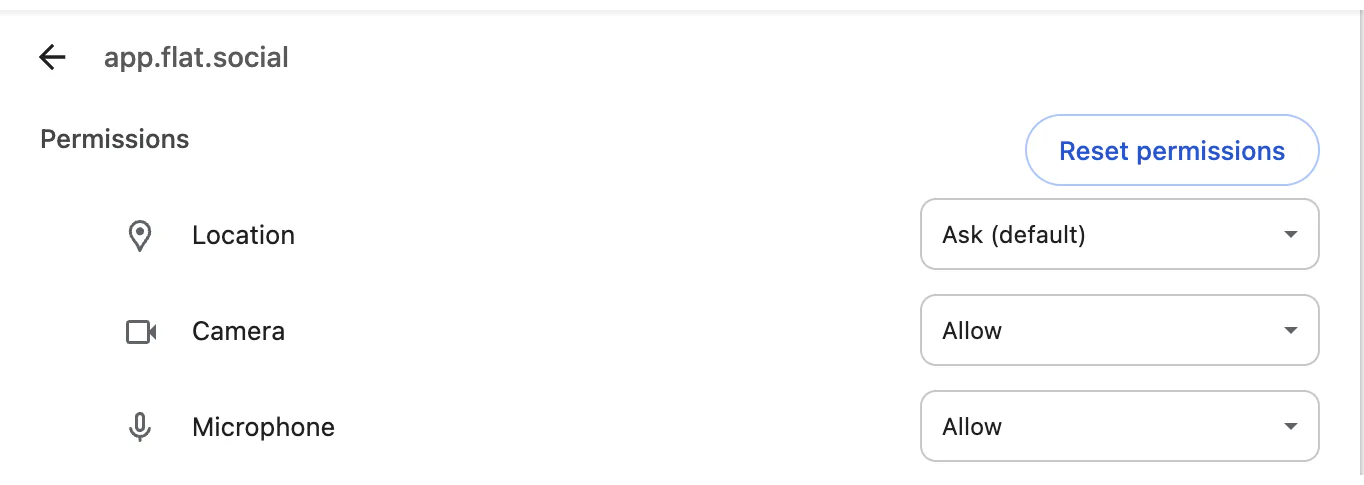
If you saw "Microphone blocked. Joining without it." or "Microphone access was denied", your browser is blocking the mic. Allow it in the site settings and reload. See Camera or mic not working.
- 4Move closer
Walk nearer to the people you are talking to, within about 7 metres for full volume. In a Conference room, distance doesn't matter.
I can't hear other people
- Check your output. Turn your computer volume up. In browsers that support it, pick your headphones or speakers under Speaker on the Audio tab; otherwise switch output in your system sound settings.
- Click once on the page. Browsers keep sound off until you interact with a page, so a first click or key press can bring the audio in.
- Check you didn't mute them for yourself. A "Muted only for you" tag under someone's avatar means you chose Mute for me. Click their avatar and choose Unmute for me.
- Check where you are standing. People inside an isolated room, pod, or stage can't be heard from outside, and in a very crowded spot only the 12 nearest speakers play.
- Using an iPhone or iPad? Voices play at one volume without direction, so you'll hear everyone in range equally.
Bluetooth headsets sometimes switch to a low-quality "call" mode or drop out. If audio is choppy, reconnect them or switch to wired headphones. Turning on Noise cancellation in the Audio settings can help if others hear background noise from you.