Monthly plan: upgrade, resize, or cancel
Pick how many people fit at once, change it anytime, and stop whenever you like.
Last updated:
What is the Monthly plan?
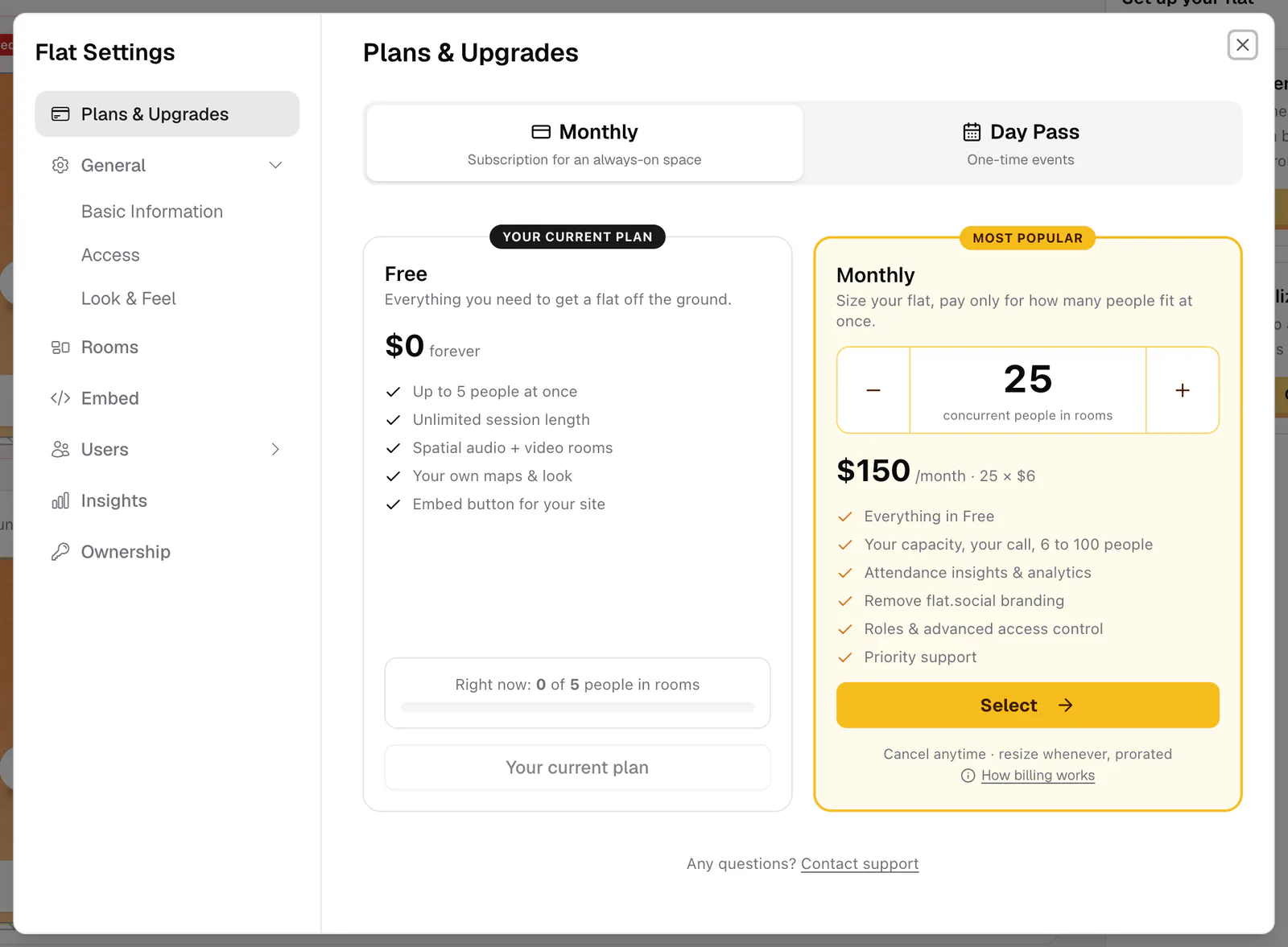
The Monthly plan is a subscription that sets how many people can be in your flat at the same time. You choose a size from 6 to 100 people and pay $6 per seat per month. A seat is a spot for one person at a time, not a named user: when someone leaves, their seat frees up for the next person.
Who can manage billing?
Only the flat owner. Billing lives in Flat Settings → Plans & Upgrades, which only the owner can open. It's also the first page the owner sees when opening Flat Settings. Guests and members without settings access see the Upgrade button greyed out, with the tooltip "Only admin can upgrade".
Your current plan shows under your flat's name at the top of the lobby, for example Free Plan · up to 5 people or Monthly plan · up to 20 people.
How to upgrade to Monthly
- 1Open Plans & Upgrades
In the lobby, click the gear (Flat settings) and choose Plans & Upgrades. You can also click your flat's name at the top of the lobby and then Upgrade.
- 2Choose your size
On the Monthly tab, use the People at once stepper to pick 6 to 100 people. The price updates as you go, for example "$120 /month · 20 × $6".
- 3Review the total
Click Select. The Upgrade to Monthly dialog shows the seat math and what you are billed monthly. Click Continue to checkout →.
- 4Pay on Stripe
Enter your payment details on Stripe's secure checkout page. If you have a discount code, enter it there.
- 5Back to your flat
You return to your flat with "You're on Monthly!" and your new capacity is live. A confirmation email, "Your Monthly plan is active", follows.
What changes on Monthly
- Capacity: your flat admits as many people at once as you have seats (Free admits 5).
- Room limits: up to 50 people in each Open Spatial room and 25 in each Conference room (Free allows 5 per room).
- Insights: the Insights dashboard unlocks. Free flats see a locked preview.
- Email invites: you can send 100 email invitations a day instead of 10. See Invite people by email or role link.
The hard ceiling is 100 people per flat. Planning something bigger? Use Talk to us on the pricing page.
Change the number of seats
You can resize whenever you like. Under your plan on the Monthly card, drag the slider until the line reads, for example, "Resize: 30 people · $180/mo", then click Continue. The Resize your plan dialog gets a quote from Stripe and shows exactly what changes.
- Going up: you pay today for the extra seats, prorated for the rest of the billing period. Confirm with Resize & pay {amount}. If the payment doesn't go through, nothing changes.
- Going down: "Your flat admits fewer people the moment you confirm — nobody who's already inside gets kicked." Stripe credits the unused difference toward your future invoices. Confirm with Resize to N seats.
To back out, click Keep N seats. After a resize you see "Resize complete" and get an email titled "Plan updated" with your new size.
Discount codes
Enter a discount code on the Stripe checkout page when you start a Monthly plan or buy a Day Pass. Codes can't be applied to a resize. Schools, universities, and non-profits can ask for an educational discount on the pricing page.
Invoices and payment method
Click Manage billing to go to your Stripe billing page, where you can update your card and see past invoices. When you leave it, you land back in your flat.
Cancel your plan
- On the Monthly card, click Cancel.
- If you have upcoming Day Passes, you first see "Your booked day passes will shrink". Day Passes only add seats on top of your plan, so once Monthly ends, each pass fits fewer people. Click I understand, continue or Don't cancel.
- The Cancel your Monthly plan? dialog tells you how long you keep your seats, for example "Your flat keeps its 20 seats until {date}, then returns to Free." Pick a reason under "Why are you cancelling?" and click Cancel at period end, or Keep my plan to stay.
There are no partial-month charges: you keep every seat until the end of the period you've paid for. You get an email titled "Your plan will end" now and "Back on Free" on the day it ends.
Changed your mind?
Until that date, the Monthly card shows "Active until {date}" and a Reactivate button. The flat info panel in the lobby also counts down ("Expires in 5 days") and offers Reactivate. Resizing is paused while a plan is set to cancel, so reactivate first if you want a different size.
If flat.social gave your flat a plan, the Monthly card says Complimentary with an end date and "This plan is on us, nothing to manage or pay." There are no billing buttons, and it unlocks the same things as a paid Monthly plan.