Day Passes for events
Add capacity for 24 hours, with no subscription.
Last updated:
What is a Day Pass?
A Day Pass is a one-time purchase that lets more people into your flat for 24 hours, starting at a time you choose. You pay $2 for each seat above what your plan already includes. It works on the Free plan and on top of a Monthly plan, and it never renews.
How is a Day Pass priced?
You choose the total number of people you want to fit, up to 100. flat.social subtracts the seats your plan includes on the day of the pass and charges $2 for each additional seat.
- On Free, 5 seats are included and the minimum is 6 additional seats. The smallest pass fits 11 people and costs $12.
- On Monthly, you can add as little as 1 seat on top of your plan.
| Your plan | Pass size | Additional seats | You pay |
|---|---|---|---|
| Free (5 included) | 11 people | 6 | $12 |
| Free (5 included) | 100 people | 95 | $190 |
| Monthly, 20 seats | 60 people | 40 | $80 |
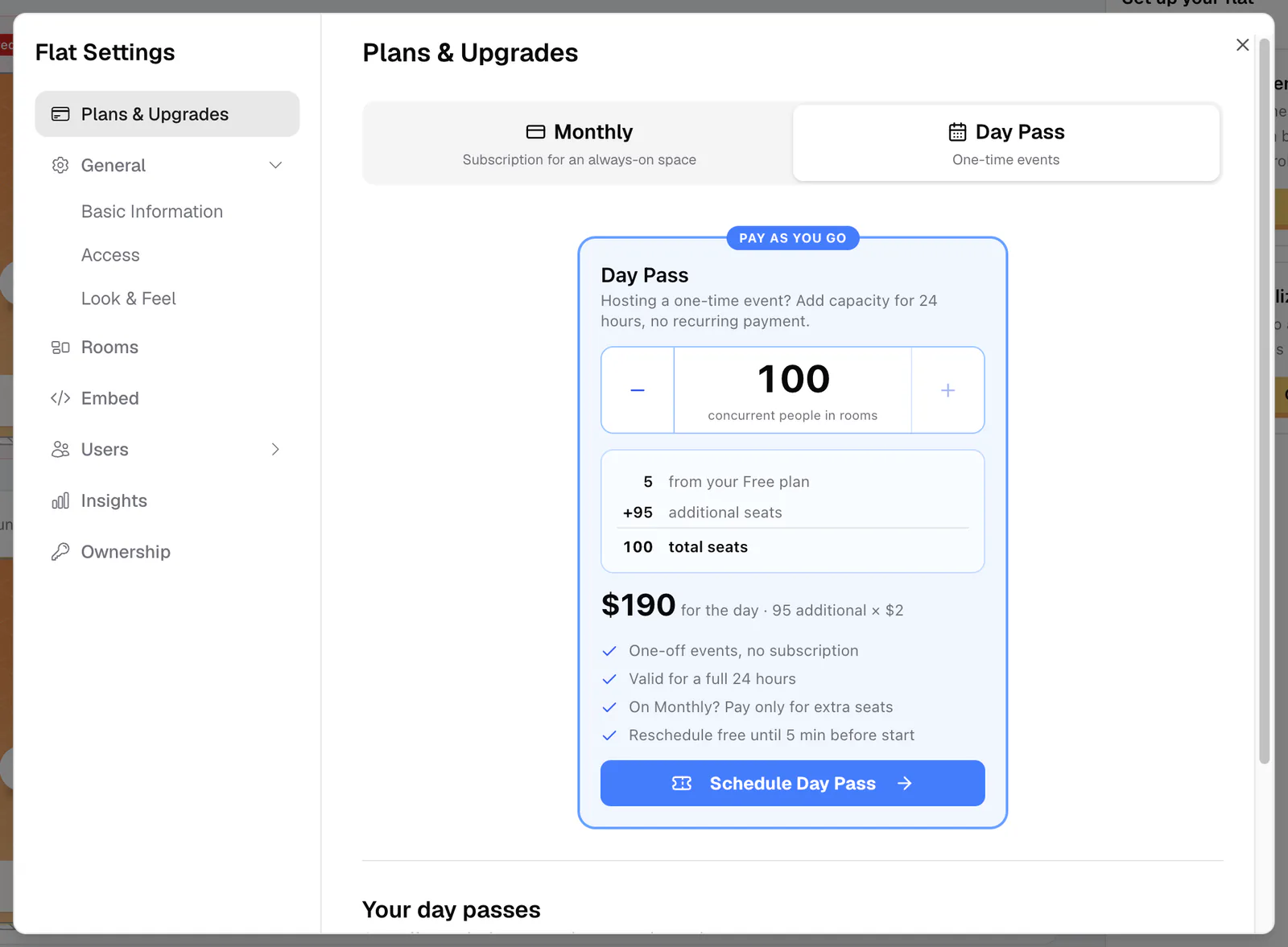
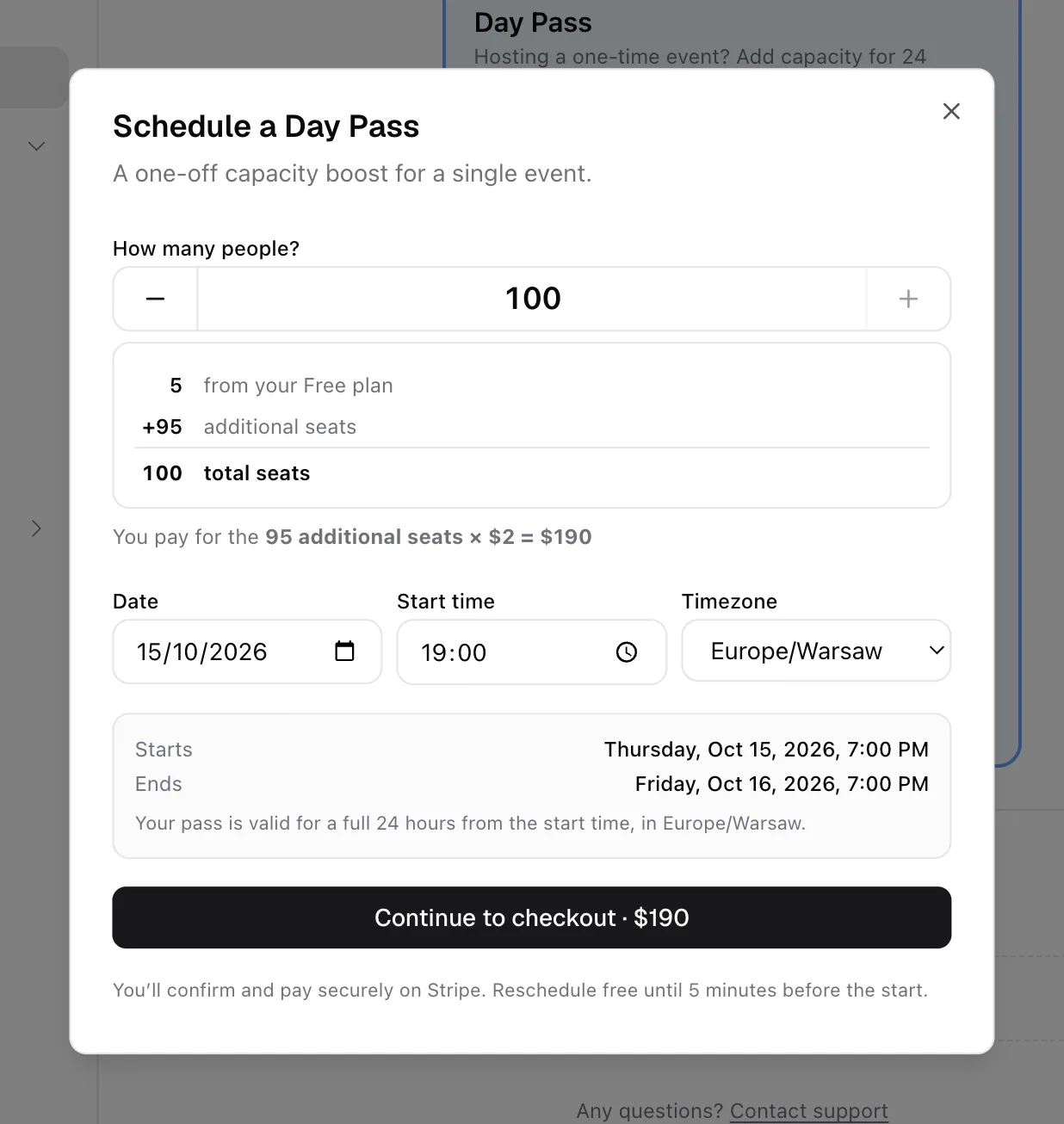
The card spells out the math as "from your Free plan", "additional seats", and "total seats", and the booking dialog confirms it, for example "You pay for the 95 additional seats × $2 = $190". Only the flat owner can buy a pass.
How to schedule a Day Pass
- 1Open the Day Pass tab
In the lobby, click the gear (Flat settings), choose Plans & Upgrades, and switch to the Day Pass tab.
- 2Set the size
Use How many people to choose the total your event needs. The price and seat breakdown update as you go.
- 3Pick the start time
Click Schedule Day Pass. In Schedule a Day Pass, set the Date, Start time (19:00 by default), and Timezone (your browser's zone by default). The Starts and Ends lines show the full 24-hour window.
- 4Pay on Stripe
Click Continue to checkout · $X and pay on Stripe. Have a discount code? Enter it on the Stripe page.
- 5You are booked
You see "Your Day Pass is booked!" and get a "Day Pass confirmed" email. The extra capacity switches on by itself at the start time.
Booking rules
- The start time must be in the future and no more than 90 days away.
- A pass lasts exactly 24 hours from its start time.
- Passes can't overlap. If you pick a time inside another pass, you see "Day passes can't overlap, pick a time after it ends."
- The size has to be bigger than your plan. Otherwise the card says "Your plan already fits N people, add more to buy a pass."
- A pass can fit at most 100 people.
- If your Monthly plan is set to cancel, a pass that starts after it ends is priced against Free, so the same size needs more additional seats. The booking dialog explains this when it applies.
What changes while the pass is active
- Your flat's capacity is your plan plus the pass seats, for the full 24 hours.
- Room limits rise to 50 people per Open Spatial room and 25 per Conference room, the same as on Monthly.
- The lobby shows Day Pass · up to N people under your flat's name.
- Insights stay locked. The Insights dashboard needs a Monthly plan, and so does the higher email invite limit.
When the pass ends, capacity returns to your plan. Nobody who is already inside is removed; the limit only applies to people coming in.
Manage your passes
Your passes are listed under Your day passes on the Day Pass tab, in the tabs Happening Now, Upcoming, Past, and Cancelled. Each pass shows when it starts (or "Active now", "Ended", "Cancelled") and "Paid $X". Open the ⋯ menu for:
- Reschedule: move an upcoming pass to a new date.
- Add to calendar: download a calendar file for the pass window.
- Download invoice: open the receipt for what you paid.
Reschedule a pass
Choose Reschedule in the ⋯ menu. Reschedule this Day Pass keeps the same size and shows the Original date next to the Rescheduled date you pick. Click Reschedule pass. It's free, and you can do it until 5 minutes before the pass starts. The same rules apply (within 90 days, no overlap). You get a "Day Pass rescheduled" email; if the old date is in your calendar, download a fresh calendar file.
Cancel a pass
You can't cancel a pass yourself. Cancellations go through the support team:
- Open Reschedule on the pass.
- Click "Need to cancel instead? Request cancellation".
- Choose a reason under "Why do you want to cancel?" and click Open email. An email to the team opens with your pass details filled in.
The team usually replies within a day. If your pass is cancelled and refunded, you get a "Day Pass cancelled & refunded" email; refunds usually reach your card within 5–10 business days. If the pass has already started, or starts in less than 5 minutes, there's no Reschedule option, so contact support directly. See Get help.
Book the pass for your best guess. If the event moves, reschedule it for free, any time up to 5 minutes before the original start.